Home › Audyssey & Dirac Live
Room correction, in the app

Control Audyssey & Dirac Live from your phone

AVR Maestro reads and switches the room correction on your Denon or Marantz receiver directly - MultEQ curves, Dynamic EQ and Volume, LFC, and Dirac Live filter slots by name - without diving into the receiver's on-screen menus.

4.9 · 75 ratings across the App Store, Google Play & Microsoft Store
Get it on Google Play Download on the App Store Get it on the Microsoft Store
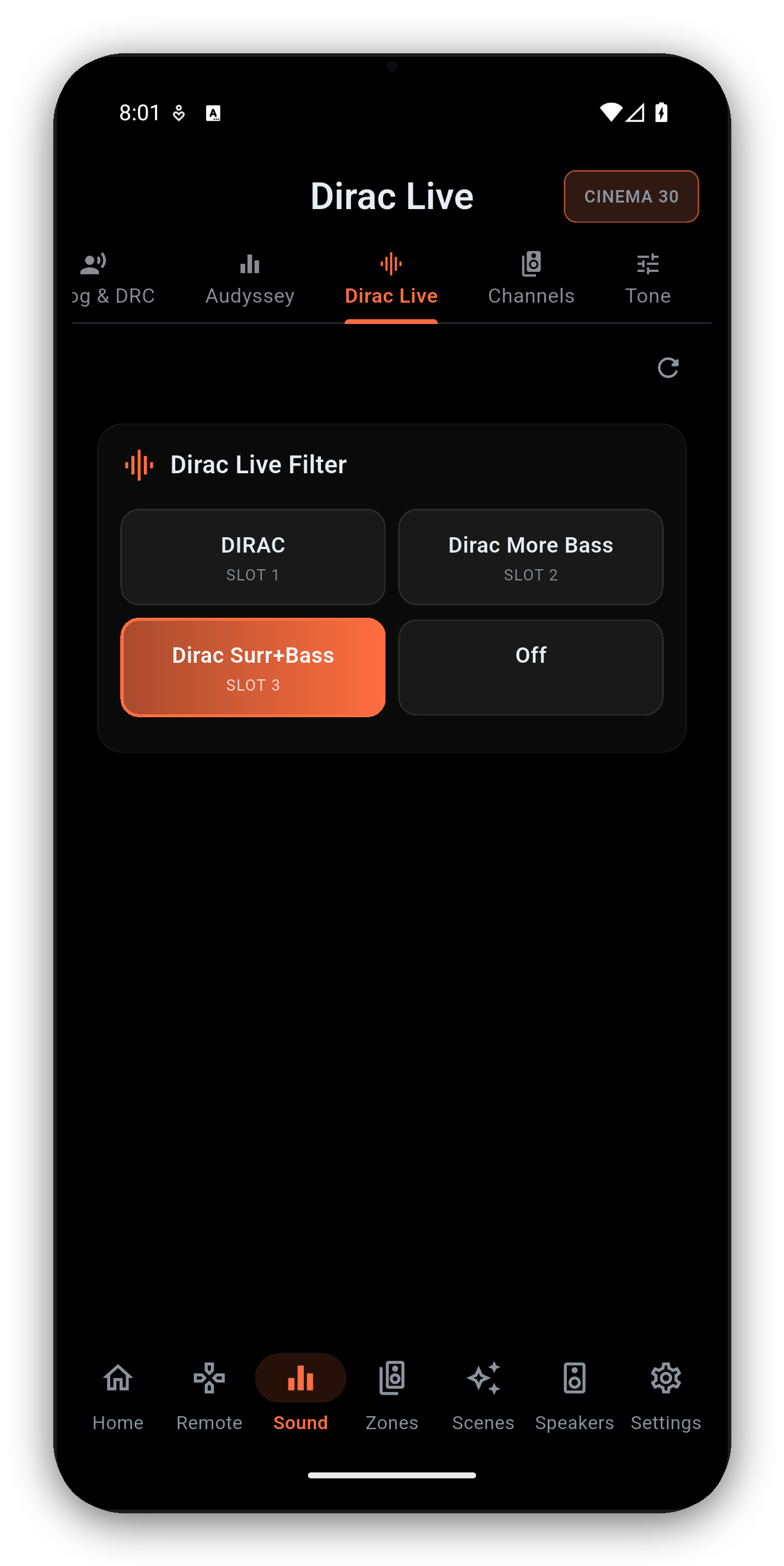
Dirac Live control in AVR Maestro
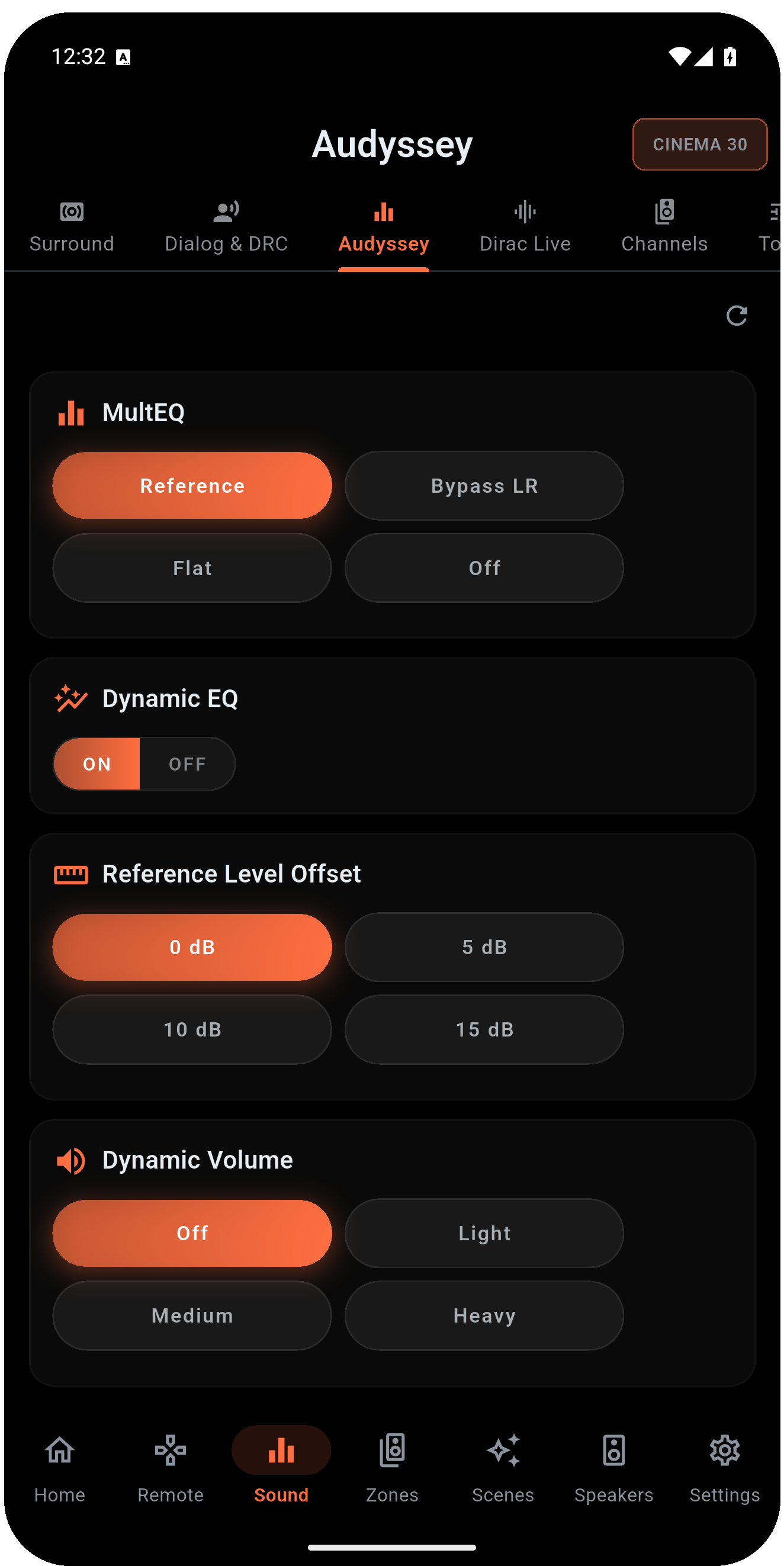
Audyssey MultEQ, Dynamic EQ and Dynamic Volume controls in AVR Maestro
Audyssey

Full Audyssey MultEQ control

Everything in your receiver's Audyssey menu, on a single screen that reads the live state.

  • MultEQ: switch between Reference, Bypass L+R, Flat and Off.
  • Dynamic EQ and Reference Level Offset for low-volume listening.
  • Dynamic Volume to even out loud and quiet passages.
  • LFC (Low Frequency Containment) with a containment-level stepper.
  • Each control appears only when your receiver actually exposes it.
Dirac Live slots
Dirac Live

Switch Dirac Live filters by name

If your receiver has a Dirac Live license, AVR Maestro makes the filters first-class.

  • Pick a filter slot by the name you gave it in the Dirac Live software - not a cryptic slot number.
  • Empty slots are hidden so you only see your real filters.
  • The active slot updates live if you change it from the receiver or elsewhere.
  • Switch your whole room tuning in a tap - movie filter, music filter, late-night filter.
Audyssey vs Dirac Live

How they differ - and how the app handles both

Both measure your room and correct the receiver's output, but they work differently. Here's the short version.

Audyssey MultEQDirac Live
Comes with the receiverBuilt in on most modelsOptional paid license
Calibrated withA phone / tablet appA computer + measurement mic
Stored asThe receiver's Audyssey resultNamed filter slots
In AVR MaestroMultEQ, Dynamic EQ/Volume, LFCSwitch active filter by name
On Denon and Marantz, Audyssey and Dirac Live are mutually exclusive and tied to the speaker preset - only one can be active at a time. AVR Maestro detects which one your active preset uses and shows its controls; the other reads "N/A while X is active." Switch speaker presets to change which calibration is in charge.

Information here is general and reflects how these systems work on current Denon and Marantz receivers; behavior varies by model and firmware. AVR Maestro is an independent app and is not affiliated with Audyssey, Dirac, Denon or Marantz.

Common questions

Audyssey & Dirac Live FAQ

Can I control Audyssey from my phone?
Yes - on receivers that have Audyssey, AVR Maestro reads and switches MultEQ (Reference / Bypass L+R / Flat / Off), Dynamic EQ, Dynamic Volume, Reference Level Offset and LFC, right from the app.
Can AVR Maestro switch Dirac Live filters?
Yes. With a Dirac Live license on the receiver, the app lists your filter slots by name and switches the active one in a tap. Empty slots are hidden and the active slot updates live.
What's the difference between Audyssey and Dirac Live?
Both correct your room. Audyssey MultEQ is built into most Denon and Marantz receivers and tuned with a phone app; Dirac Live is an optional paid license many enthusiasts prefer, calibrated from a computer. They are mutually exclusive per speaker preset on these receivers, and AVR Maestro controls whichever your active preset is using.
Can I run both at the same time?
No - on Denon and Marantz they are mutually exclusive and tied to the speaker preset. AVR Maestro detects this per preset, so you switch which calibration is active by switching speaker presets.

Tune your room from the couch

Audyssey, Dirac Live, surround modes, speaker presets and more - all in one fast app. One-time purchase, no ads, no subscriptions.
Get it on Google Play Download on the App Store Get it on the Microsoft Store

See why owners switch from the official app →