AVR Maestro is a premium network controller for Denon and Marantz AV receivers. It speaks their native protocols and surfaces the features the official apps bury - or skip entirely. No ads. No subscriptions. No data leaves your network.


Power, volume, inputs, surround modes, room correction, speaker setup, multi-zone audio, an FM/AM tuner and a live now-playing display - all over your local network, all in a clean, fast interface that adapts to exactly what your chassis supports.
Talks to your receiver the way the receiver expects - reliable, instant, no cloud round-trips.
The app reads your model's capabilities and only shows what your receiver actually has. No dead buttons.
No ads, no subscriptions, no tracking. Your setup and your data stay on your network.


Capture your receiver exactly how you like it and bring it back instantly - the killer feature no official app has.


A full DSP suite that mirrors your receiver's audio menu - and shows the live signal as it plays.
Layout, distances, levels, crossovers, subwoofer and speaker presets - the full setup suite, with each screen following the active Speaker Preset.


Independent power, input and volume for Zone 2 and Zone 3 on multi-zone receivers - and Scenes can capture and restore zone state too.


Full D-pad and transport control with a live header showing the input, sound mode, and the actual channels in use.
AVR Maestro is deep. Here are the gems worth knowing about.
Save full-setup Scenes, and tap a volume preset chip to jump straight to a level you like.
Make the source list yours - "Nvidia Shield", "Xbox", "PS5" - in the order you actually use them.
Pick your own accent color and theme the whole app to taste, on top of light / dark / system.
Add, remove and reorder Home cards so the dashboard shows exactly what you care about.
Customize Navigation and Customize Tabs let you trim the app down to the features you use.
Tune by frequency or recall saved station presets, on receivers with a built-in tuner.
Live track, artwork and transport controls for HEOS sources, right on the dashboard.
Export your receivers, Scenes and settings, and restore them on a new phone in seconds.
Home-screen widgets and hardware volume-key control (Android) for the fastest possible access.


Networked Denon & Marantz receivers from 2014 onward:
X-series networked AV receivers.
AVC-A1H, AVC-X8500H and newer.
Cinema 30, 40, 50 and up.
SR5015, SR6015, SR7015 and newer.
AV7706, AV8805, AV10 and newer.
It comes down to your network, not just the model. Confirm the receiver's web portal, the HEOS app and the official Denon/Marantz app can all reach it, and that its network ports aren't blocked. If those can talk to it, AVR Maestro should see it too.
The complete manual. Everything below adapts to your receiver - the app only shows controls your chassis actually exposes, so your screens may show fewer options than listed here.
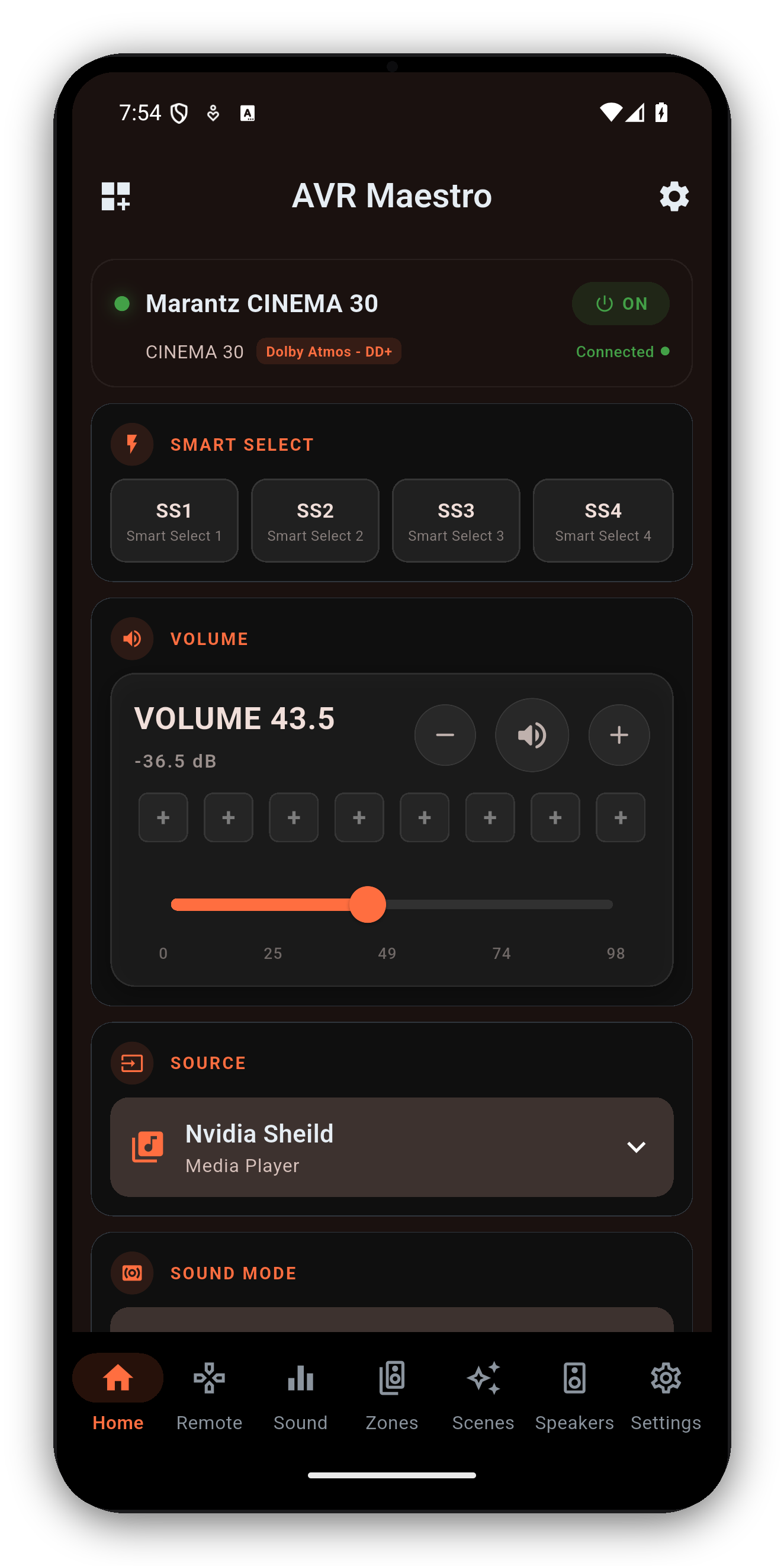
Your at-a-glance home base. A device status card (model, connection, power) stays pinned at the top, with a customizable grid of widgets below it.
Customize it: tap the Customize Dashboard icon (top-left). In edit mode: drag a card to reorder, tap the red circle to remove it, Add opens a sheet of widgets you don't have yet, Reset restores defaults, Done exits. Cards are dimmed while editing so you can't change a receiver setting by accident.
| Widget | What it does |
|---|---|
| Volume | Slider with dB readout, mute, and 8 saved volume presets. |
| Source | Open the input picker; long-press tiles to reorder. |
| Sound Mode | Current surround mode; tap for a grouped picker. |
| Now Playing | Album art, track info and transport for HEOS sources. |
| Zones | Compact Zone 2 / Zone 3 status + quick controls. |
| Quick Select | Denon Quick Select / Marantz Smart Select buttons. |
| Speaker Preset | Preset 1 / 2 switcher (chassis-dependent). |
| Audyssey / Dirac | One-glance calibration state + quick deep-link. |
| Channel / Sub Levels | Per-channel and subwoofer level snapshots with steppers. |
| ECO, Sleep, DRC, Restorer, Video, Room Size, LFE | One-tap toggles and pickers, each shown only when supported. |
Widgets only render when your receiver exposes the feature.
Capture your receiver's state and recall it in one tap.
A Scene can capture input, master volume, sound mode, Audyssey (MultEQ / Dynamic EQ / Dynamic Volume / LFC), Dirac slot, speaker preset, channel & subwoofer levels, tone, Cinema EQ, center spread/level, Eco, sleep timer, dimmer, HDMI audio out, speaker virtualizer, Zone 2/3, and the tuner station. Recall replays only the settings you captured.
A model- and mode-aware DSP suite. Tabs appear only when your receiver supports them; some (like Shape) slide in based on the active surround mode.
The full speaker-setup suite, read live from the receiver. Every screen follows the active Speaker Preset.
Independent control of Zone 2 and Zone 3 on multi-zone receivers.
Each zone gets its own power, volume, mute, input and quick-volume presets, fully separate from the main zone. Zone state syncs live - change a zone from the receiver's panel or remote and the app updates within a second. When a zone is on, its card also shows the live HEOS now-playing stream for that zone with transport controls.
Four pages - swipe or tap the page tabs.
On receivers with a built-in tuner. The station card shows the live band, frequency and active preset, and follows the receiver in real time.
If the Radio tab is hidden, re-add it from Settings → Customize Navigation (it only appears when your receiver exposes a tuner).
Everything that tailors the app to you and your gear.
| Section | What's in it |
|---|---|
| Devices | Switch receivers, full Device Information, Manage Receivers (rename/delete), Add Receiver. |
| Appearance | Theme (Light / Dark / Device / TJ Mode - pick any accent color and the app rebuilds its palette), Display Size, Widget Size, Customize Navigation, Customize Tabs. |
| Audio | Volume Step (0.5-2.0 dB) and whether the absolute volume or dB shows on top. |
| Help | Explanation cards toggle, restore dismissed cards, and a live Debug Log with one-tap Save & Share for support. |
| Developer Tools | Hidden until you long-press the version number - raw Telnet / HEOS commands, AJAX dump, and a volume-cap wire diagnostic. |
| Backup | Export every receiver, preset and preference to a JSON file; import to restore. |
| App | About, website, Discord, Facebook, privacy, terms, licenses. |
When the active source exposes metadata, the Dashboard's Now Playing card shows album art, track / artist / station info and transport (play / pause / next / previous).
To browse music - stations, queues, streaming services, HEOS rooms - tap Launch HEOS on the Now Playing card. AVR Maestro opens the official HEOS app for browsing; once playback starts there, AVR Maestro takes back over the now-playing display, transport and widgets. Analog, optical/coaxial and HDMI passthrough sources don't report metadata, so the card stays empty for those.
Free, no ads, no subscriptions. Download it and connect to your receiver in under a minute.